



If you’ve been looking for a speedy and budget-friendly solution for transforming your photo or text prompt into a clip that can stop someone in their tracks, you’ve likely heard of the hailuo ai video generator already. Designed by the Chinese AI start-up MiniMax, Hailuo AI has quickly gained popularity; thus, it is now among the main topics in AId video-making tools, being placed next to such companies as Runway, Kling AI, and Google Veo.
This guide will explain to you what the hailuo ai video generator is, how much money you should pay for it in 2026, who would be interested in this service, and how it compares with other similar services.
What Is the Hailuo AI Video Generator?
If you’ve been looking for a speedy and budget-friendly solution for transforming your photo or text prompt into a clip that can stop someone in their tracks, you’ve likely heard of the hailuo ai video generator already. Designed by the Chinese AI start-up MiniMax, Hailuo AI has quickly gained popularity; thus, it is now among the main topics in AId video-making tools, being placed next to such companies as Runway, Kling AI, and Google Veo.
This guide will explain to you what the hailuo ai video generator is, how much money you should pay for it in 2026, who would be interested in this service, and how it compares with other similar services.
Core abilities comprise:
- Transforming text into video based on verbal instructions
- Animating images into video and enabling motion to still frame
- Providing camera control, character characterisation and audio for the newest models
- Delivering video in different resolutions up to 1080p, while some templates support 2K format
- Having a variety of templates for rapid animation creation (e.g. product demonstration, commerce videos, and other)
- Providing customers with a right to publish without a watermark
The platform is used by social media specialists, eCommerce sellers, educators, and marketers creating ads.
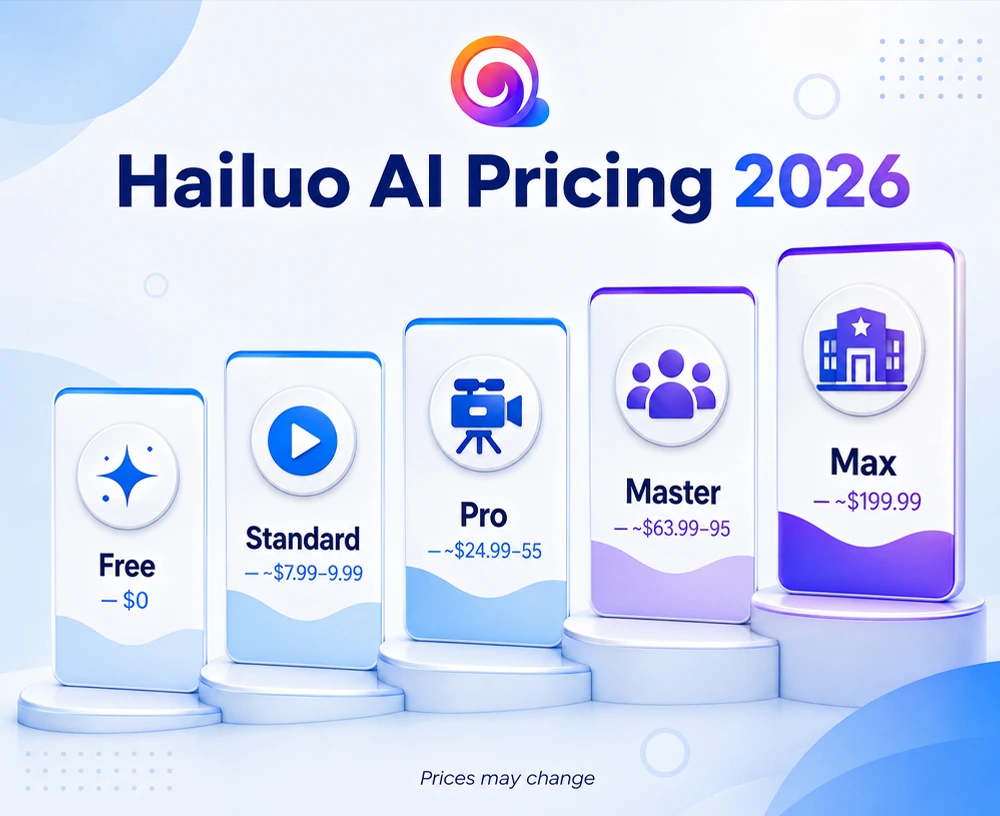
Hailuo AI Video Generator Pricing (2026)
Hailuo employs a subscription system based on credits and provides both free and paid levels. Pricing has changed on several occasions since the launch, thus use the figures below for informational purposes only and make sure to check the website for the current price before making a purchase.
| Plan | Approx. Price/Month | Credits | Best For |
| Free | $0 | Limited daily generations, watermarked | Testing the tool before committing |
| Standard | ~7.99–9.99 | ~1,000 credits | Casual creators, a few clips per week |
| Pro | ~24.99–55 | Higher credit pool | Regular content creators |
| Master | ~63.99–95 | Larger credit pool | Small teams, agencies |
| Max | ~$199.99 | ~20,000 credits, near-unlimited access | High-volume studios and agencies |
There are several things that you need to understand before you select a particular plan:
- All the paid plans remove the watermark as well as grant permission for commercial usage.
- Rendering in a higher resolution (Cine graphics/ 1080p) requires much more credits than a simple audiovisual clip (about 512p). Hence, the cost of creating a video is higher than just the cost revealed in the plan.
- Usually, if annually paid, one can achieve savings up to 20%, while offers for quarterly payments can lead to even bigger discounts.
- Credits reset each month and cannot be transferred to the next month, i.e. you will lose your credits if you do not use them.
If you are comparing prices and different subscription plans across other AI platforms as well, it makes sense to read our overview of Genspark AI pricing which is rather similar and is useful for companies where budget is a crucial aspect.
Hailuo AI Video Generator: Pros and Cons
Pros
- Super speedy generation speed (usually 30-90 seconds for one clip)
- Allows both text and images to be entered on the same project
- Relatively cheaper pricing than high-end tools such as Runway
- Good and adequate free tier without requiring a credit card
- Strong performance on motion realism and physics-based scenes
Cons
- The credit consumption process for HD/Notable Quality 1080p video output takes place very quickly
- The longest video segment length is shorter than many competitors (approximately 10–15 seconds)
- Pricing model has changed multiple times, making purchases confusing for consumers
- There is no advanced editing program in the system like the one available in Runway
How to Use the Hailuo AI Video Generator (Quick Steps)
- Select how you want to put in input by uploading a reference picture, typing in text prompt, or combining the two.
- Compose a coherent prompt describing the scene, mood, movement of the camera, and style.
- Edit settings like duration, aspect ratio, and resolution.
- Run the animation and expect to see results at the same time between 30 and 90 seconds.
- Watch the video and download it, as your subscription allows you to do it without a watermark.
Hailuo AI vs. the Competition
The AI video sector is quite saturated, with the hailuo AI video generator being one of many options on the market. Here are some other noteworthy options.
- Runway: Offers better cinematic quality, longer video clips (up to 16 seconds), upscaling of 4K videos, and complete editing features but at a cost that is much higher than the monthly fee charged by hailuo. Best for professionals making video films and advertisements.
- Kling AI: Great at creating realistic characters and human beings.
- Luma Dream Machine: Notable for its movement and following the requests of its users.
- Google Veo: Great at photorealism and integration of Google’s creative tools.
As for the hailuo AI generator, it has an advantage in terms of speed and price as compared to other AI video generators. In terms of polished commercial video, the other players on the market – Runway and Veo – are the ones to look at.
If you plan to acquire an AI tool set, check our AI technology review section as it contains a number of interesting products including our own reviews of Vincent AI, DeepSwap AI, and OurDream.ai.
Is the Hailuo AI Video Generator Worth It?
Creatives seeking inexpensive video content for social networking, product launch, or concept trials should check out the hailuo ai video creator because it is a solid deal at the Standard and Pro levels. Studios that operate on high volumes of 1080p should do their homework since the cost of credits increases quickly with increasing resolution.
If you still consider which AI video software fits into your workflow, it may be sensible to start with a no-cost plan as we suggest trying out the free version of any other white label software before implementing it into a client agency workflow.
FAQs
Does Hailuo AI allow its users to use their video generator without paying?
Yes. Hailuo AI’s free plan allows for the production of several short videos that will be stored with a watermark and created without inputting the information connected with the payment account. The paid packages start from 7.99-9.99 dollars per month and offer customers opportunities to make videos without a watermark and sell them commercially.
What is the video length limit in Hailuo AI video generator?
Usually, the videos created via Hailuo AI do not last longer than 6-10 seconds, while a few of its new tools can produce slightly longer videos. It cannot compete with Runway.ai, which can create long video clips (up to 16 seconds in length), meaning that Hailuo works mainly on short videos rather than long videos.
Which video generator is the best alternative to Hailuo AI?
It truly depends on purposes. Runway provides the highest quality video clips while Kling AI is good at producing animated videos with realistic human motions. Luma Dream Machine can create videos with special camera effects. For low-cost short social video clips, Hailuo is usually the cheapest solution.
